Automating the Unfixable: How I Tamed a Critical Polkitd Memory Leak
In the world of server maintenance, few things are as terrifying as opening htop and seeing red bars everywhere.
Recently, I ran into a critical issue on one of our Virtual Private Servers (VPS). The server was becoming sluggish, and services were timing out. When I investigated, I found that a single process was eating up almost 100% of both our RAM and our Swap memory.
The culprit? polkitd (The PolicyKit Daemon).
This is the story of how I went from manual server restarts to engineering a fully automated, fail-safe memory management solution.
🚨 The Incident: When 4GB Isn’t Enough
It started with a simple observation: the server was running out of breath.
My first reaction was standard triage. I assumed we were simply under-provisioned or experiencing a temporary spike. I added an additional 4GB of Swap file (bringing the total memory cushion to 8GB) hoping that would give the server enough breathing room to stabilize.
I restarted the service manually to flush the memory:
sudo systemctl restart polkitdThe memory usage dropped. The red bars in htop turned green. I thought the job was done.
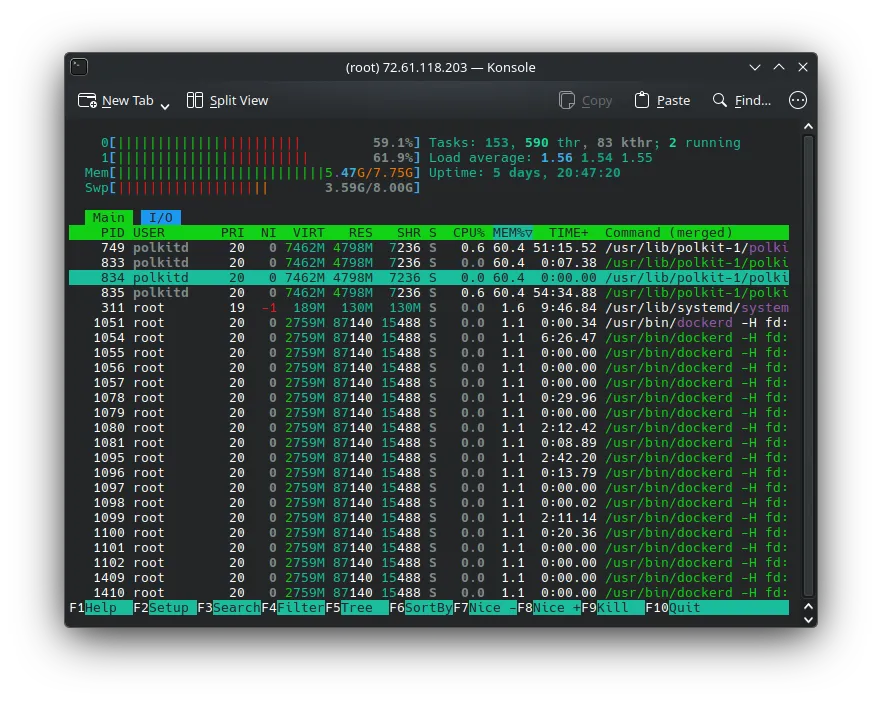
But a few days later, the creep started again. It wasn’t a sudden spike; it was a slow, consistent memory leak. The daemon was hoarding memory and refusing to let it go, eventually threatening to crash the entire node.
🕵️ The Investigation
As a Computer Science student and DevOps enthusiast, I knew that constantly restarting a service manually wasn’t a “solution”—it was a chore. I needed to understand the why.
I dove into the internet. I scoured forums, StackOverflow, and eventually landed on the official polkit source repository.
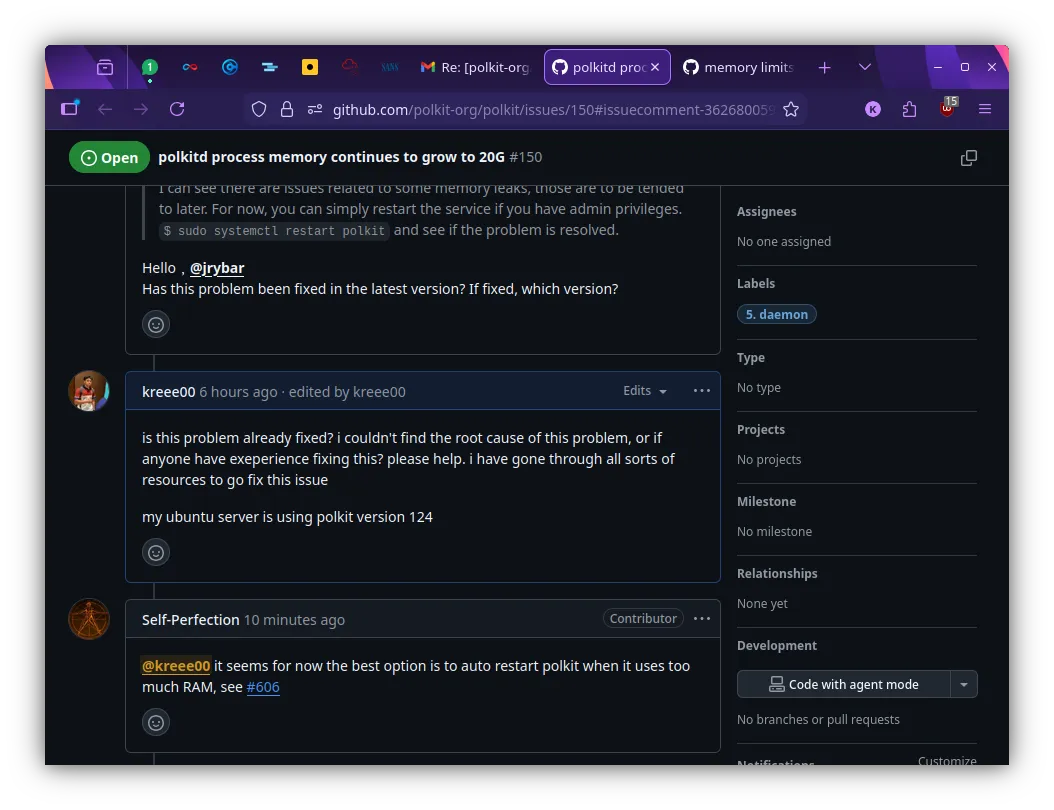
I wasn’t alone. I found threads of other sysadmins complaining about the exact same behavior. When I asked in the community if there was a patch available, the answer was disheartening: “Up until now, there is still no fix.”
I was at a crossroads. I couldn’t fix the C code in polkitd overnight, and I couldn’t wait for an upstream patch while my production server risked downtime.
🛠️ The Solution: If You Can’t Fix It, Manage It
If I couldn’t stop the leak, I had to contain it. I decided to build a “governor” for the process—an automated system that watches polkitd and restarts it gracefully before it becomes a problem.
I designed a two-layer defense system.
Layer 1: The Smart Hook (EarlyOOM)
For the primary defense, I utilized earlyoom, a daemon usually used to kill processes when memory is critically low. However, I didn’t want to wait until the server was crashing to take action.
I wrote a custom Bash hook script that:
- Identifies the polkitd process ID.
- Reads the specific memory usage from /proc/[pid]/status.
- Calculates its consumption percentage against the total available RAM.
- Triggers a graceful systemctl restart if it exceeds a 12% threshold.
This ensures the service is refreshed without forcefully killing it, maintaining system stability.
Layer 2: The Fail-Safe (Systemd Resource Control)
Scripts can fail. Cron jobs can hang. As a DevOps engineer, you always need a backup plan. I needed a hard ceiling that the operating system would enforce, regardless of whether my script was running.
I used systemd’s built-in resource control to set a hard limit on the service. I applied this using the following command:
sudo systemctl set-property polkit.service MemoryMax=1500MThis command modifies the service unit configuration on the fly. Now, if my hook script fails to catch the leak and polkitd balloons past 1.5GB, systemd will step in and throttle or restart the process to save the rest of the system (and my Docker containers) from crashing.
🚀 The Result
I deployed the solution on a Monday. Since then, I haven’t had to SSH into the server to clear memory once.
- Before: Daily manual checks, fear of crashes, 100% swap usage.
- After: The hook script runs silently in the background, keeping polkitd lean, and the server metrics are stable.
I packaged this entire solution, including the detection logic, the hook scripts, and the installation steps—into an open-source tool so others facing this specific bug can implement a fix in minutes.
Check out the repo here: 👉 github.com/kreee00/polkitd-memory-manager
🧠 Lessons Learned
This project reinforced a few key DevOps philosophies for me:
- Don’t wait for upstream: Sometimes the “official fix” is months away. You have to build the bridge yourself.
- Observability is key: Without tools like htop and understanding how to read /proc files, I would have just kept buying more RAM.
- Automation > Manual Intervention: If you have to do it twice, script it. If it keeps breaking, automate the fix.
Dealing with memory leaks is never fun, but turning a system instability into a reliable, automated, “set-it-and-forget-it” solution was a massive win.
Thanks for reading my blog post :)